Skip to content
Earthmoving project utilizing the Trimble Earthworks Grade Control Platform and Trimble WorksManager software for field to office connectivity
Trimble WorksManager

Connect the office to the field — seamlessly

Empower your teams to make timely decisions with office to field connectivity that enables efficient collaboration. Send construction-ready models to machine operators and survey crews to keep your entire team on the same page and on track — while keeping costs down.

Overview

Maximize every minute on your jobsite

Trimble WorksManager software keeps you connected right where you are. Bring office and jobsite together, enabling quick decisions anywhere.

Design management and transfer
3D jobsite visualization, analysis and editing tools
Track machine status and location in real-time
Use one design for any on-site tech (ISO15143-4 compatible)
Remote log-in for operator troubleshooting and assistance
Trimble WorksManager software construction-ready models from the office to enable survey crews in the field the ability to manage technology assets across jobsites
Benefits

Empower your team to make better decisions

Monitor

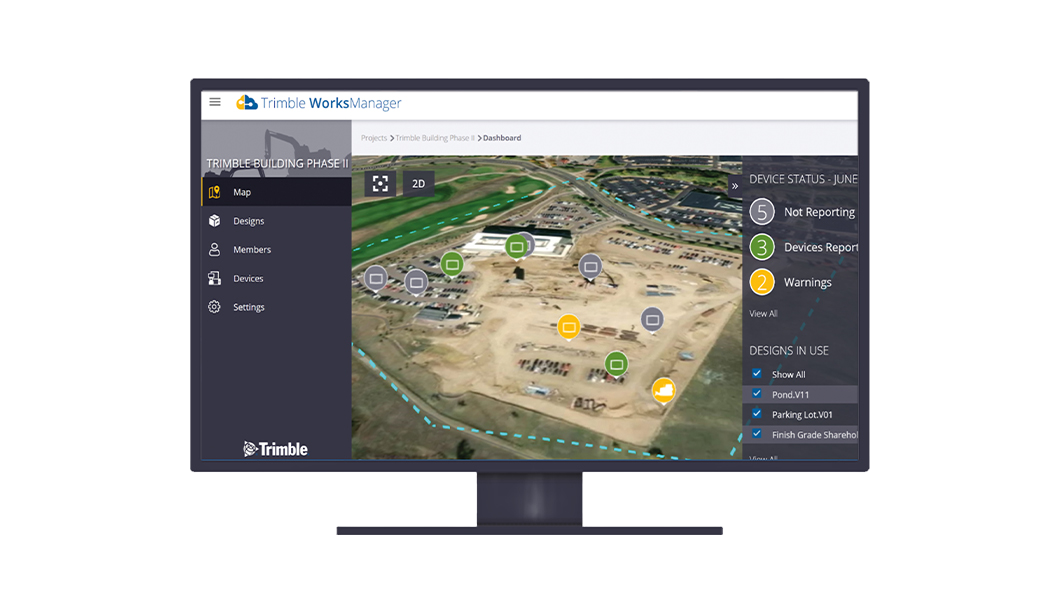
Keep track of the location of all your devices and machines with an intuitive, at-a-glance dashboard that shows your digital asset locations and current design information at all times.

Desktop monitor displaying Trimble WorksManager software tracking the location of jobsite assets to optimize resource utilization
Even if we had grade control technology on the machines, we were still limited to manual data transfer with USB sticks. WorksManager streamlined that process very quickly.
Rory Prendergast
Peace River Hydro Partners

Integrates with

Trimble Earthworks Grade Control platform on dozer and excavator working on construction site
Machine control and guidance

Trimble Earthworks grade control

Trimble Earthworks provides precise machine control that reduces rework by helping operators get it right the first time, regardless of their skill level.

Learn more
Trimble Siteworks Positioning system working with a 3D model while capturing accurate data on a paving project
Site surveying

Trimble Siteworks

Trimble Siteworks positioning systems are designed to eliminate downtime by making every minute more productive. Handle complex files and 3D data sets quickly, so you can spot issues and solve problems before they slow you down.

Learn more
Construction office using the Trimble Connect software common data environment for effective project collaboration
Software

Trimble Connect

Collaborate effectively and efficiently with a single source of truth for all data generated during the lifecycle of a construction project.

Learn more
Worker in a construction office using WorksOS software for real-time jobsite visibility
Software

Trimble WorksOS

Accurately monitor jobsite activity and real-time progress-to-plan, remotely, with information straight from the machine.

Learn more
Multiple desktop monitors displaying Trimble Business Center software in an construction office
Software

Trimble Business Center

Make better decisions, decrease costly mistakes and increase efficiency in the office and on the job site. Powerful tools help you quickly and easily create accurate, integrated 3D constructible models for construction surveying and machine control.

Learn more

Interested to learn more or where to buy?

Attention

We tried to combine the products in your guest cart with your saved cart, but we encountered an issue while merging them. When choosing a subscription, please select either monthly or yearly as they cannot be combined. Kindly review your cart before proceeding to checkout.

Cart Updated
undefined

undefined:
undefined
Attention

The software you are trying to purchase is not available in your country or region.

Cart Updated
The items in your cart have been updated for two reasons. Firstly, the prices now match the currency linked to your account address. Secondly, some items have been removed because they are not available for purchase in your region. Please review your cart before proceeding.

undefined:
undefined
Cart Updated
The items in your cart have been updated for two reasons. Firstly, you've added too many of one item to your cart. Secondly, some items have been removed because they are not available for purchase in your region. Please review your cart before proceeding.

undefined:
undefined
Cart Updated
The items in your cart have been updated for three reasons. Firstly, the prices now match the currency linked to your account address. Secondly, you've added too many of one item to your cart. Thirdly, some items have been removed because they are not available for purchase in your region. Please review your cart before proceeding

undefined:
undefined
Cart Updated

Your currency has been changed to match the currency associated with your account address.

Cart Updated

Your cart has been updated for two reasons. First, the prices now reflect the currency associated with your account address. Second, you've added too many of one item to your cart. Please review your cart before proceeding.

Cart Updated

While combining the products in your guest cart with your saved cart, at least one item in your cart has exceeded the maximum allowable quantity. Please review and correct your cart before proceeding to checkout.